
Are you satisfied with the current performance of your restaurant? Do you want to explore the powers of customer feedback? If yes, then you are at the right place.
What are the three major problems Tablevibe is solving for me?
Increasingly dependent on delivery platforms that demand up to 40% in commission fees.
Little or no data about customers
Google reviews are increasingly important to acquire new customers but are hard to actively boost.
How can I get started on Tablevibe?
Getting started with Tablevibe is really simple. Onboard your restaurants in just 2 steps. Here's a quick guide on how to get started with Tablevibe
Step 1: Book a Demo Call
We believe that “Effective communication is 20% what you know and 80% how you feel about what you know.” and therefore we try to share our Table-vibe using a Demo Call. You can book a free Demo Call with our experts who will take you on a quick tour of the Tablevibe Dashboard and show you how it can be used to maximize the growth of your restaurant.
Step 2: Setup your account and add locations
Log in and go to Account Tab > Subscription - try for free for 30 days upon signing up
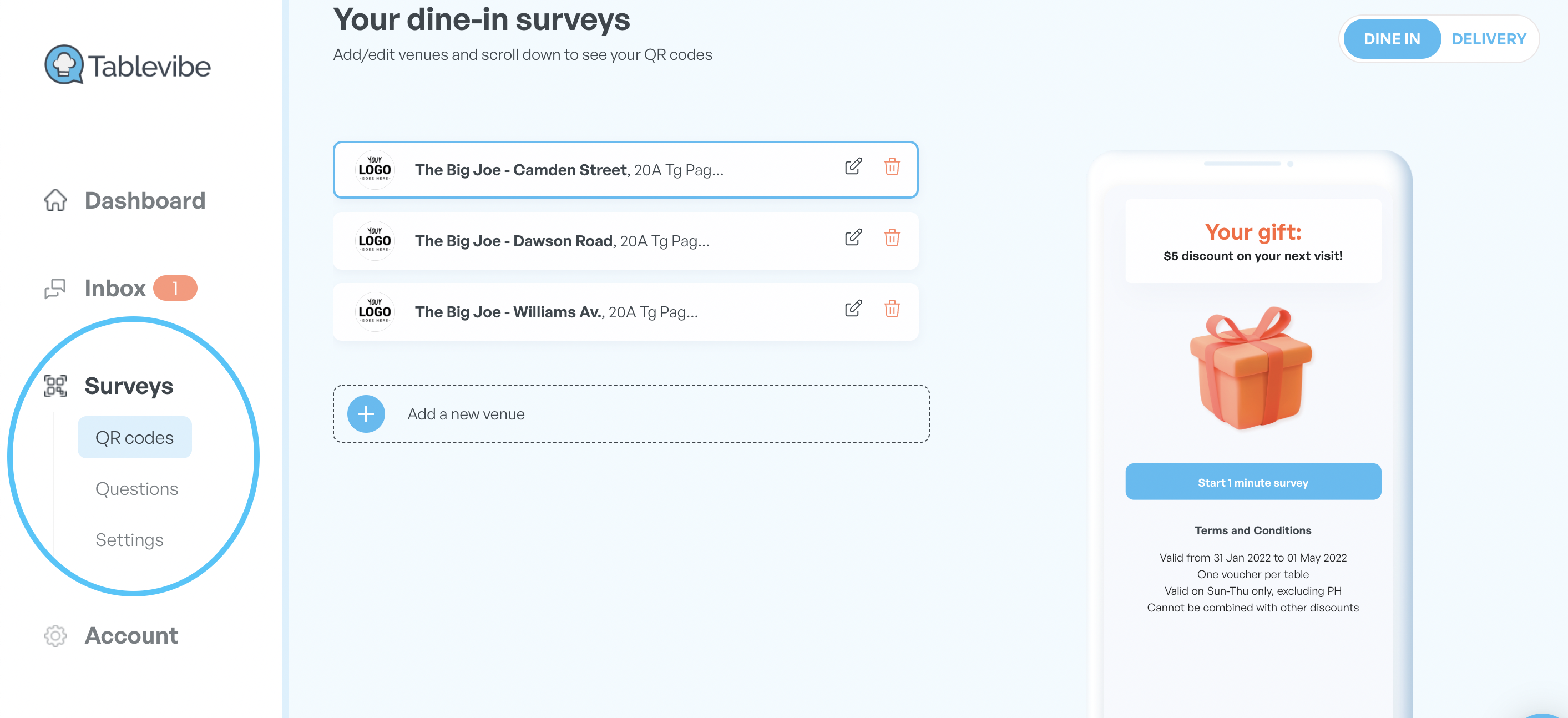
Go to the Surveys tab to add the company's logo and staff headshots.
Click on the reward tab under Settings to add your guest reward and conditions.
Visit the survey tab to download your QR code. You can display this on your bill folder, tables, and/or receipts.
Sit back, order a pizza and by the time it arrives, your Tablevibe account will be all set as the process takes not more than 30 minutes :)
That was it! Book a Demo Call with our experts right away to get started.